
Mobile App
Selling on the Mobile POS
The mobile Point of Sale is built to be fast at the counter. Here's a full sale, start to finish.
1. Pick the products
The POS screen shows your products as tappable cards, each with its code, name, price, and a +VAT marker. Use Search products… to find something by name, or tap Scan to scan a barcode. Tap a product to add it to the cart.
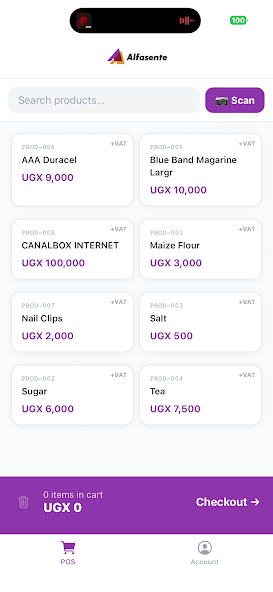
A bar at the bottom always shows how many items are in the cart and the running total. Tap Checkout → when you're ready.
2. Review the cart
In the cart you can:
- Adjust each line's quantity with the − and + buttons, or remove a line with ×.
- Add a per-line discount (Disc UGX).
- See the Subtotal, VAT, and Total update automatically.
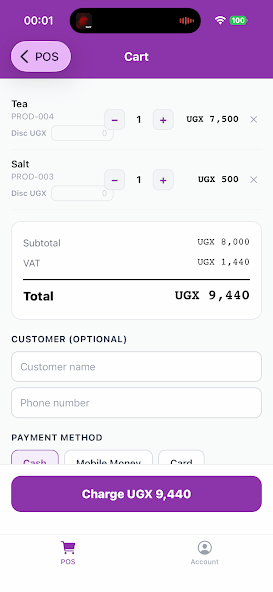
Optionally add a Customer (name and phone number), then choose a Payment method — Cash, Mobile Money, or Card.
3. Charge
Tap Charge UGX <total> to complete the sale. The app records the sale, reduces your stock, and posts the accounting entries — the same as the web ERP.
4. Share the receipt
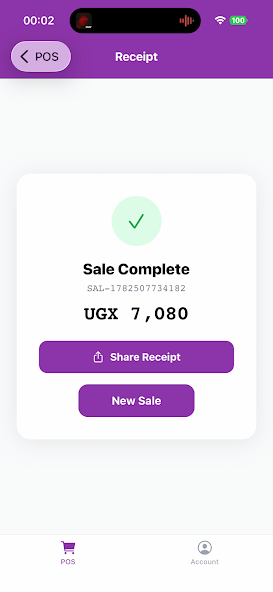
When the sale is done you'll see a Sale Complete confirmation with the sale number and amount. From here you can:
- Share Receipt — send the receipt to the customer.
- New Sale — clear the cart and start the next one.
That's it. Every sale you make on your phone shows up in your Alfasente ERP account alongside your web sales, so your reports, stock, and books stay in one place.
Last updated 2026-08-11