
Billing
Subscription & plans
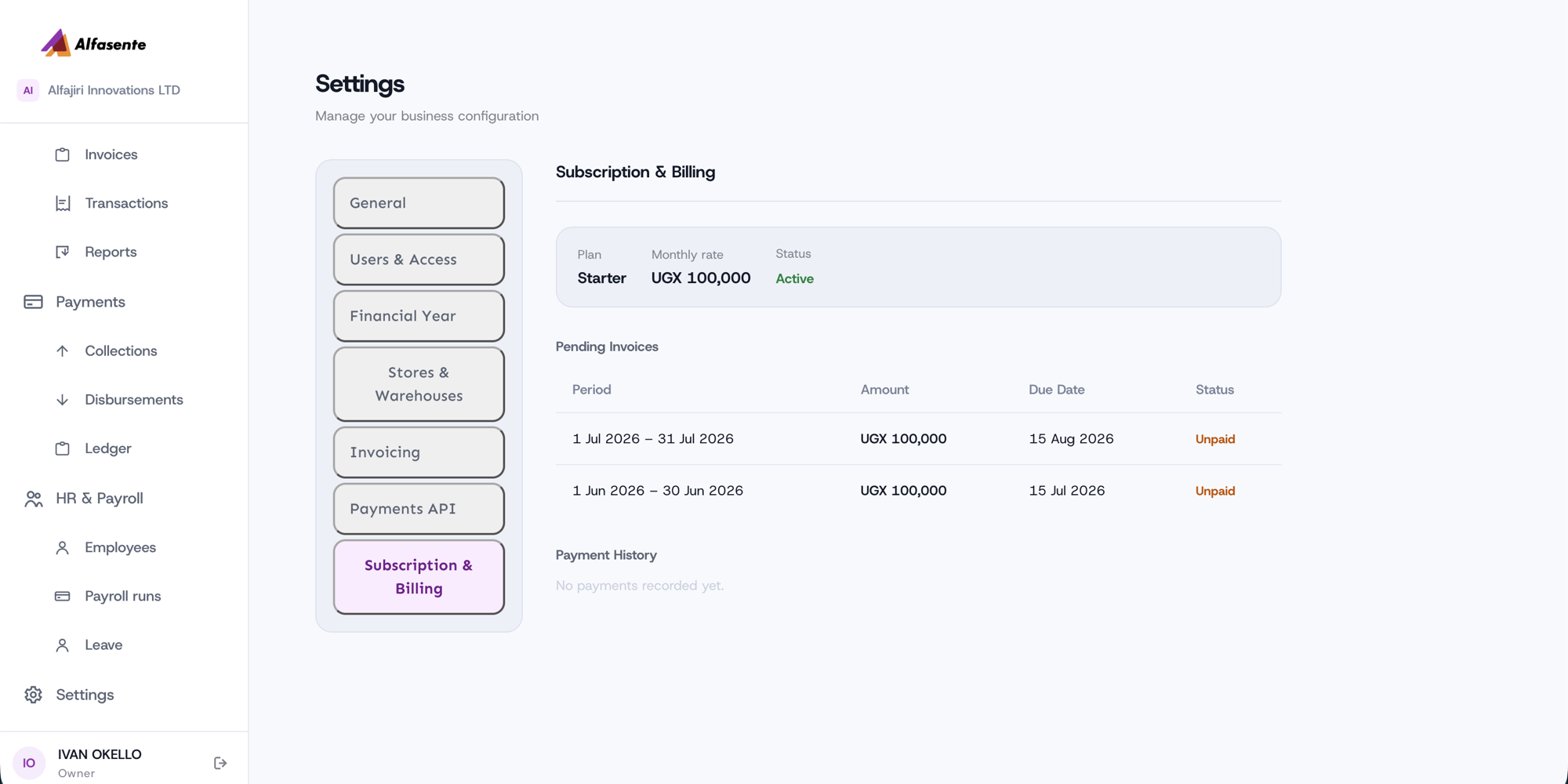
You manage everything about your subscription from Settings → Subscription & Billing. Every plan starts with a 30-day free trial. You can pay monthly, or pay for a full year up front and save.
Choosing a plan
Pick the plan that matches the size of your team and how you operate:
| Plan | Price | Users | Highlights |
|---|---|---|---|
| Starter | UGX 100,000 / mo | Up to 10 users | For smaller teams getting started. |
| Business | UGX 500,000 / mo | Up to 100 users | Multi-branch support. |
| Enterprise | Contact us | Up to 999 users | Multi-branch; custom pricing. |
Every plan includes a 30-day free trial, so you can try Alfasente ERP before you pay. Prices and plans are shown live on the pricing page and the sign-up screen — including a lighter-weight, lower-cost tier for smaller teams.
Paying monthly or yearly
You choose how you pay:
- Monthly — you're invoiced each month at your plan's monthly rate.
- Yearly — pay for 12 months up front at a discount. The same discount applies to every plan, so the effective monthly rate is lower when you commit to a year.
You'll see the yearly price ("or UGX X/mo billed yearly — save Y%") on the pricing page and at sign-up. To switch an existing subscription to yearly, open Settings → Subscription & Billing and choose Switch to yearly — we'll prepare a single annual invoice you pay by mobile money. Once it's paid, you won't be billed again until the year is up, and the renewal date is shown on the billing screen.
What the billing screen shows
On Settings → Subscription & Billing you'll find:
- Plan — your current plan.
- Rate — what you pay, and whether you're billed monthly or yearly.
- Status — whether your subscription is Active.
- Renews — for yearly subscriptions, the date your next annual invoice is due.
- Pending Invoices — each invoice's period, amount, due date, and whether it's Unpaid or Paid.
- Payment History — a record of your past payments.
How billing works
- Billing runs monthly by default, or yearly if you've chosen to pay for a year up front.
- Each invoice has a due date — pay before then to keep your subscription Active.
- Yearly subscribers get one invoice per year, at renewal — not a monthly one.
- Check Pending Invoices to see what's owed and when, and Payment History for what you've already paid.
Need help choosing?
For Enterprise, or if you're not sure which plan fits, use the Contact us option to talk it through.
Last updated 2026-08-14