
Financial Services
SMS Messaging
Send an SMS to one member or a whole group, confirm money movements as they happen, and set up reminders that send themselves. Messages go out under Alfasente's sender ID, so members see a recognisable name rather than a phone number.
Go to Financial Services → Messages.
SMS credit
Each message costs UGX 40. You buy credit up front and it is deducted as messages send.
| Price | UGX 40 per message |
| Balance | Shown at the top of the Messages page |
| Top up | Buy credit, pay by mobile money — credit lands as soon as payment confirms |
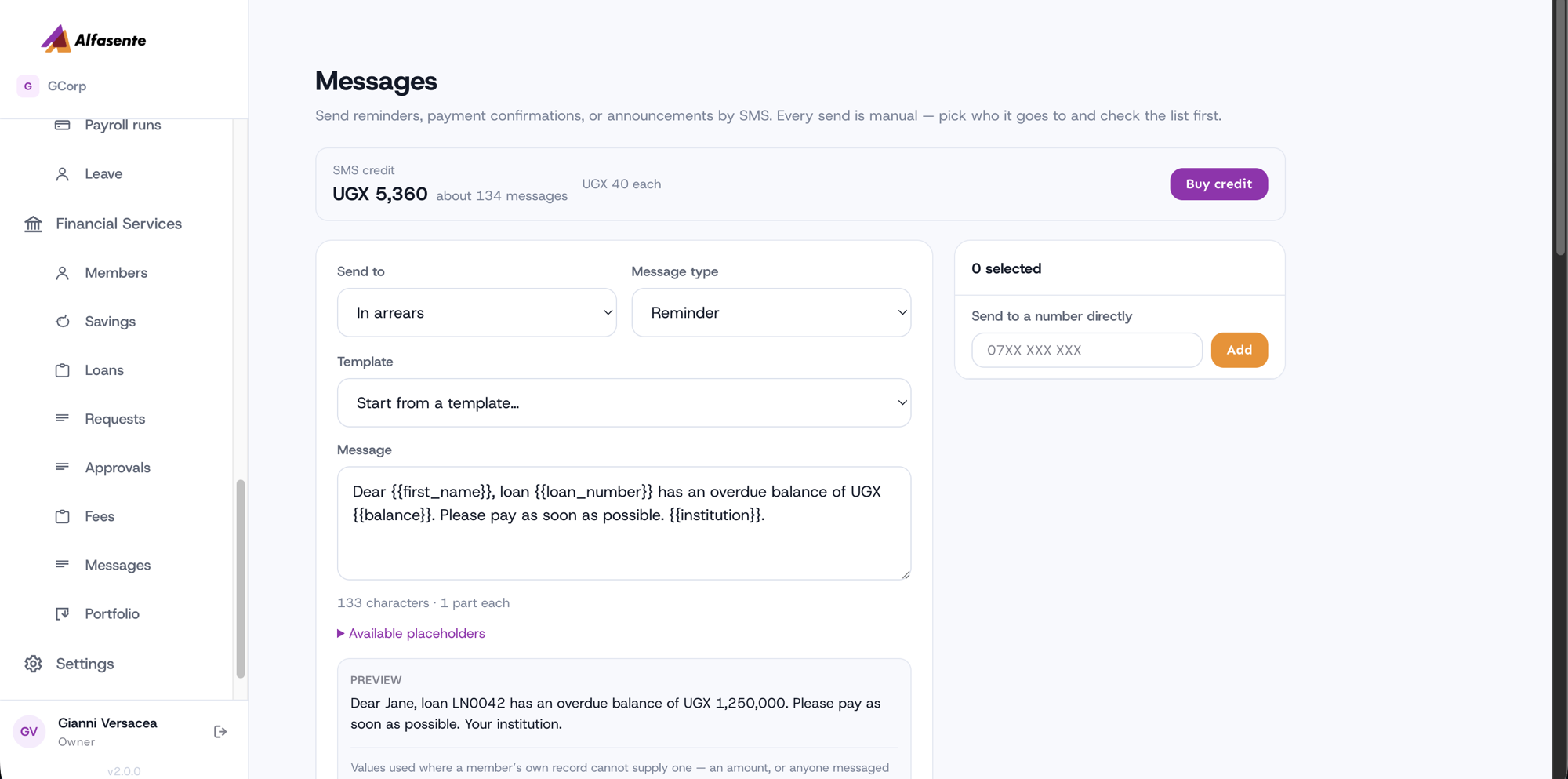
A long message is more than one SMS. The send form tells you how many before you send, so a 160-character message costs 40 and a 200-character one costs 80.
If your balance runs out, the message is not lost. It is recorded as skipped, with the reason, so you can see exactly what did not go and send it again after topping up.
Sending a message
Send to picks the group, and you tick or untick individuals from there:
| All members | Everyone on the book |
| Active borrowers | Members with a live loan |
| In arrears | Members behind on a payment |
| Due this week | Members with an instalment falling due in the next seven days |
| Savers | Members with a savings account |
You can also send to a number directly — type it in and press Add. Useful for someone whose number is not on their record yet.
- Choose who it goes to.
- Pick a template, or write the message yourself.
- Fill in any values the template asks for.
- Check the preview, then send.
Templates and placeholders
A template holds placeholders that are filled in per member — {{first_name}}, {{balance}},
{{loan_number}}, {{institution}} and so on. You fill in the values once and every recipient
gets their own version.
Click any recipient to see their message exactly as they will receive it. Numbers can be edited before sending, so a member whose phone has changed still gets the message.
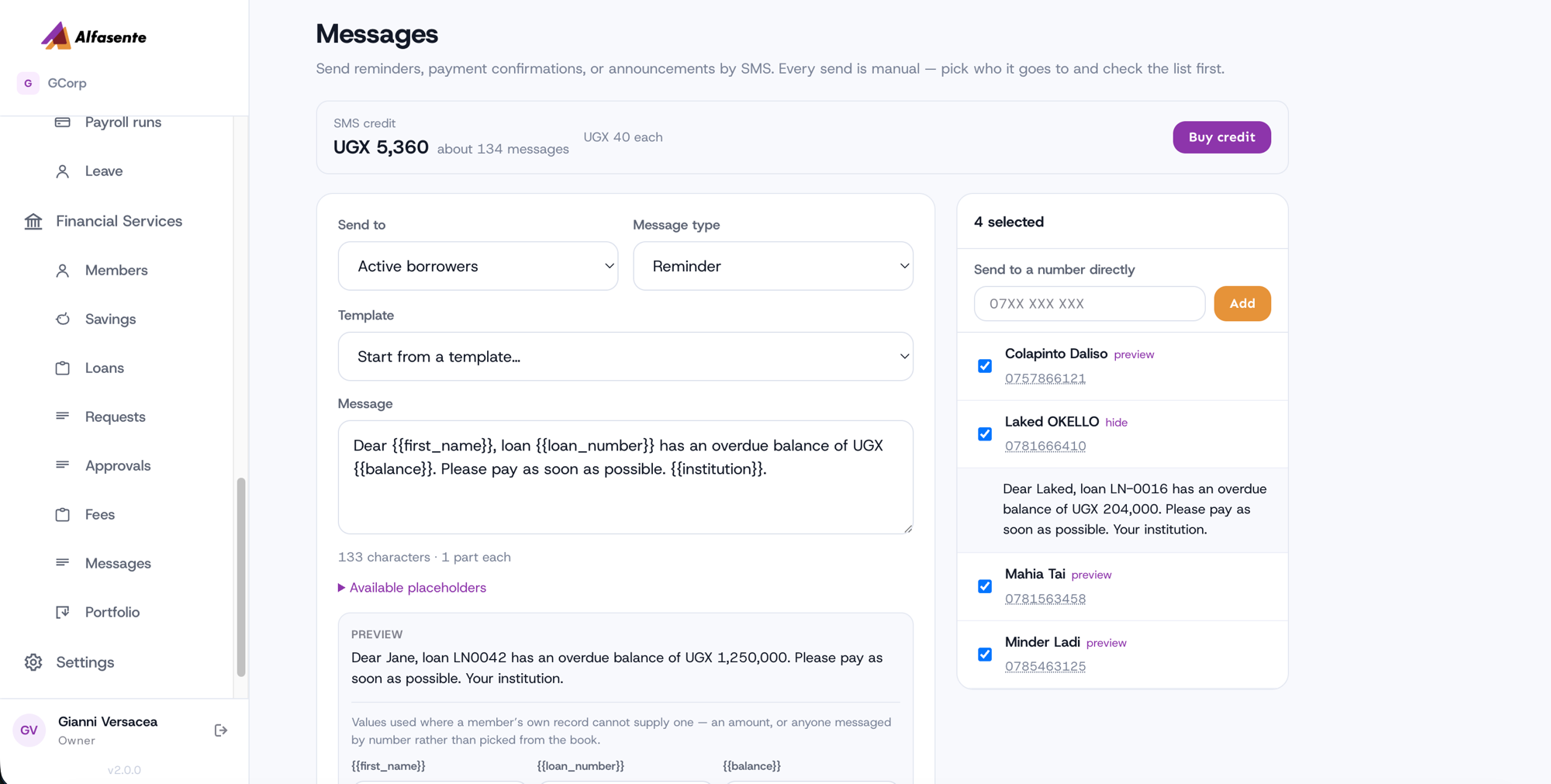
The form will not send a message with an unfilled placeholder in it. That check exists because a member receiving "Dear {{first_name}}, your balance is {{balance}}" is worse than no message at all.
Messages that send themselves after money moves
After you record a deposit, a withdrawal, a loan disbursement or a repayment, you are offered a message confirming it — already filled in.
The figures come from the account, read back after the money moved, not from the form you just typed. So a deposit confirmation quotes the member's real new balance, and the institution name is your organisation's, not a placeholder.
You can edit any of it, or skip it entirely. Nothing sends without you pressing send.
Scheduled messages
Rules that run once a day, at 08:00, and find their own recipients.
| Trigger | Sends to |
|---|---|
| Before a payment is due | Members with an instalment falling due in N days |
| After a payment is missed | Members whose instalment is N days overdue and still unpaid |
| On a member's birthday | Members whose date of birth is today |
| Monthly savings balance | Every member with savings, on a day of the month you choose |
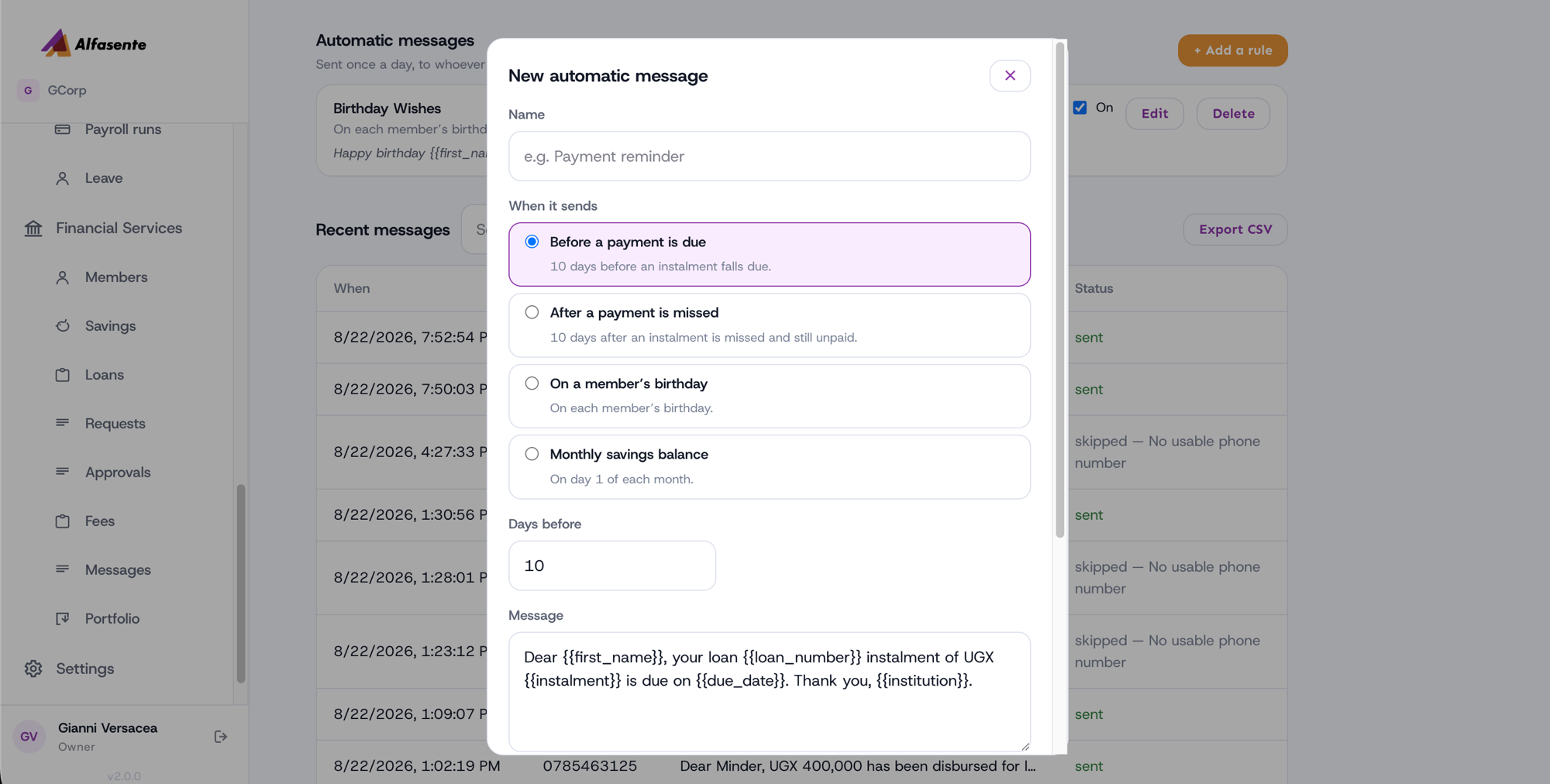
A rule describes who to send to, not a fixed list, so it never goes stale. Add a member today and tomorrow's reminders include them.
Each trigger ships a message you can use as-is or rewrite. A rule can only use placeholders its
trigger can fill — a birthday rule cannot use {{loan_number}}, and the form will not let you
save one that does. Otherwise it would go out to everyone, every year, with a hole in it, and
nobody watching.
Nobody is ever messaged twice for the same thing. If the day's run happens again, the second run sends nothing.
A note on monthly rules
Pick a day from 1 to 28. A rule set for the 30th would never fire in February, so the highest day you can choose is the 28th.
Seeing what happened
The Messages log lists every message with its status.
| Status | Meaning |
|---|---|
| Sent | Delivered to the network |
| Queued | Waiting — retries on its own, see below |
| Skipped | Not sent. The reason is shown: no phone number, or not enough credit |
| Failed | The network rejected it. The provider's reason is shown |
Queued means the hold-up is at Byte Village's end, not yours. You have already paid for the message, so it waits and sends itself once the platform tops up — usually within minutes. You do not need to do anything, and you are not charged twice.
Related
- Members — where phone numbers are kept
- Loans and Savings — the money movements that offer a confirmation
Last updated 2026-08-22